thankQ Help
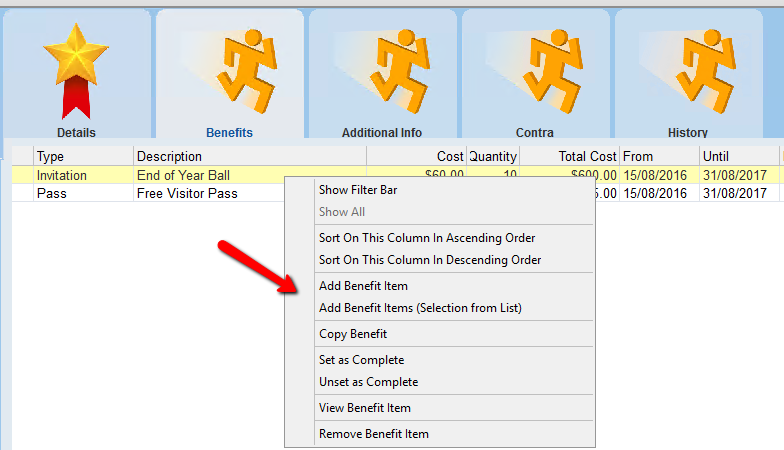
1.Right click in the window of the Benefits tab
2.Select Add Benefit Item from the menu
 |
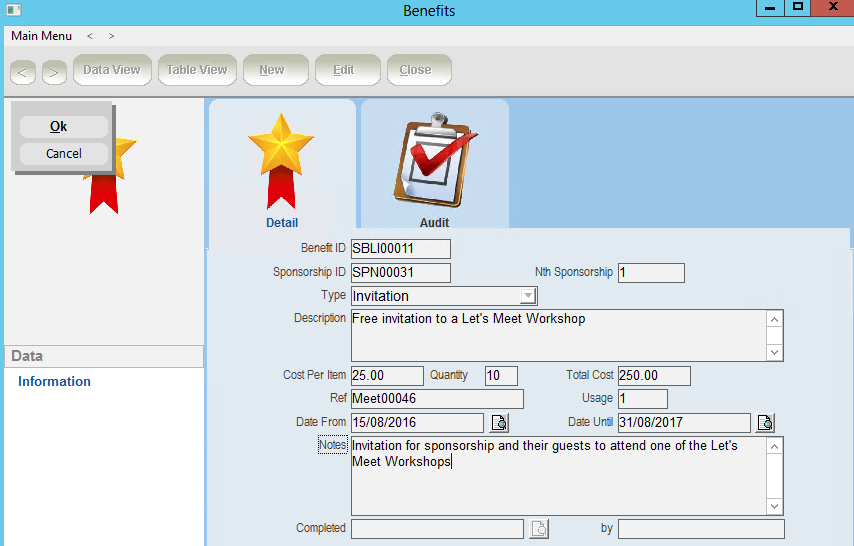
3.Fill in the details of the benefit on the Benefit List Items form
Benefit ID |
a unique identifier generated by thankQ |
Type |
the type of benefit item e.g. Discount, Invitation, Pass, Ticket |
Description |
a description of the benefit item e.g. Free Visitor Pass |
Cost Per Item |
the estimated cost of the benefit item |
Quantity |
the number of this particular item the sponsorship type will receive as a benefit |
Total Cost |
the cost will be automatically calculated by thankQ using the cost per item and quantity |
Ref |
a reference number for the benefit item e.g. a ticket number or a visitor pass ID |
Usage |
the number of times a benefit item can be used e.g. 12 visits from a visitor pass |
Date From and Date Until |
use the Date From and Date Until fields to set a time period for which the benefit is valid |
Notes |
any additional information you wish to record about the benefit item |
4.Click OK to create the new benefit item
 |
5.Click Close on the Benefit Items form to exit